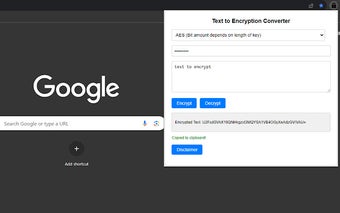
Text to Encryption Converter - Encrypt and Decrypt Text with Ease
Text to Encryption Converter is a Chrome extension developed by NicoDev. It falls under the category of Browsers and is specifically categorized as an Add-ons & Tools. This free extension allows users to encrypt/decrypt text using various encryption algorithms such as AES, SHA, MD5, Binary, Base64, and more.
With Text to Encryption Converter, users can easily encrypt or decrypt their text using popular encryption algorithms like AES, MD5, SHA-256, and DES. The extension provides a simple user interface where users can select the encryption type, input their key and text, and then choose to encrypt or decrypt. Whether you need to secure sensitive information or decode encrypted text, this extension has got you covered.
Additionally, Text to Encryption Converter also offers the ability to translate text into binary or base64 formats. This feature can be handy when working with binary data or when you need to encode text for specific purposes.
It is worth mentioning that Text to Encryption Converter is made using CryptoJS, a well-known JavaScript library for cryptographic functions. Users should take note of the disclaimer provided in the extension's popup before using it for any sensitive information.
Overall, Text to Encryption Converter is a useful Chrome extension that provides a convenient way to encrypt/decrypt text and perform binary/base64 translations. Whether you're a security-conscious individual or someone who frequently works with encoded text, this extension offers a simple and accessible solution.